Email Intent
Tue, Apr 21, 2020
Read in 3 minutes
Now we're going to take our form, picture, and signature and send all that information to the coordinator's email address. This'll be a practice in setting up an email intent with multiple attachments.
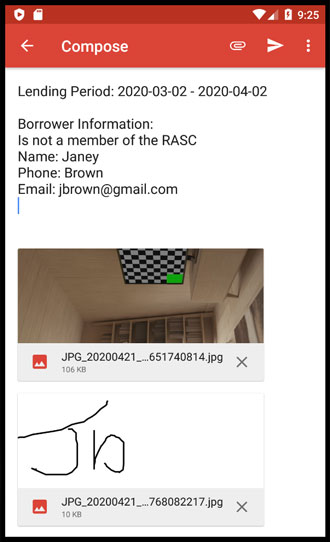
All of this logic will be going into our form_save area which currently just houses our signature save. We’ll extend that to also grabbing all of our form field data and then setting up an email intent to ship that all off.
In the onClick
So let’s grab all those form fields. Depending on how exactly you followed along building the form you may have less/different fields. This goes inside the if statement after the mSig.save().
If you didn’t setup the menu and preferences you’ll just need to replace the coordEmail assignment with your email address.
String coordEmail = prefs.getString(
                        getResources().getString(R.string.prefkey_email),
                        getResources().getString(R.string.prefdefault_email)
                    );

// Get form inputs
EditText etScope = findViewById(R.id.et_scope_name);
EditText etEq = findViewById(R.id.et_other_equipment);
EditText etLendStart = findViewById(R.id.et_fromDate);
EditText etLendEnd = findViewById(R.id.et_toDate);
EditText etBorrowerName = findViewById(R.id.et_borrower_name);
EditText etBorrowerPhone = findViewById(R.id.et_borrower_phone);
EditText etBorrowerEmail = findViewById(R.id.et_borrower_email);

String scopeName = etScope.getText().toString();
String equipment = etEq.getText().toString();
String lendStart = etLendStart.getText().toString();
String returnDate = etLendEnd.getText().toString();
String borrowerName = etBorrowerName.getText().toString();
String borrowerPhone = etBorrowerPhone.getText().toString();
String borrowerEmail = etBorrowerEmail.getText().toString();

String member = isMember == true ? "Is an RASC Member" : "Is not a member of the RASC";
Pretty basic stuff, nothing tricky going on there. Next up is a bit more interesting.
Your form probably has some required fields, so setup an if statement that checks for empty in those and only proceeds if those pass. Inside there we’ll build a string that will be our message body and begin setting up the email intent. We don’t need to check for signature since the only way we’d get here is if that already passed.
if (scopeName.length() > 0
    && lendStart.length() > 0
    && returnDate.length() > 0
    && borrowerName.length() > 0
    && borrowerPhone.length() > 0)
{
    StringBuilder formMessage = new StringBuilder()
        .append("Coordinator: " + coordName + "   (" + coordPhone + ")\n\n")
        .append("Equipment Borrowed: " + "\n")
        .append(scopeName + "\n")
        .append(equipment + "\n\n")
        .append("Lending Period: " + lendStart + " - " + returnDate + "\n\n")
        .append("Borrower Information:" + "\n")
        .append(member + "\n")
        .append("Name: " + borrowerName + "\n")
        .append("Phone: " + borrowerPhone + "\n")
        .append("Email: " + borrowerEmail + "\n");

// Setup Email Intent
final String SUBJECT = "Loaner Form - ";

Intent emailIntent = new Intent(Intent.ACTION_SEND_MULTIPLE);
emailIntent.setData(Uri.parse("mailto:"));
emailIntent.setType("text/plain");
emailIntent.putExtra(Intent.EXTRA_EMAIL, new String[]{coordEmail});
emailIntent.putExtra(Intent.EXTRA_SUBJECT, SUBJECT + borrowerName);
StringBuilder is just one of many ways to concatenate a string in java. I chose this way because it was easy to understand and reasonably efficient for the way we were using it with multiple variables.
We need to use ACTION_SEND_MULTIPLE versus simply ACTION_SEND because, you guessed it, we have multiple attachments! The rest of these are pretty self explanatory. Mailto, plain-text, email address to send to, email subject.
Next, our attachments and message body. But first, confirm that a photo was taken by the form:
if (imagePath != null) {
    ArrayList<Uri> files = new ArrayList<>();
    files.add(Uri.fromFile(new File(imagePath)));
    files.add(Uri.fromFile(new File(sigPath)));

    emailIntent.putParcelableArrayListExtra(Intent.EXTRA_STREAM, files);
    emailIntent.putExtra(Intent.EXTRA_TEXT, formMessage.toString());

    this.startActivity(Intent.createChooser(emailIntent, "Sending email..."));
} else {
    Toast.makeText(this, "Need a photo", Toast.LENGTH_SHORT).show();
}
Just like setting up a bundle, if we want to throw on multiple attachments we can only do it with one object – so we need to make an ArrayList to house the photo and signature. Luckily we kept around those image/sig paths so we can make a file reference from those and add them to our list. Then it’s just a matter of using putParcelableArrayListExtra into the intent to stream the files.
Then finally it’s just a simple putExtra for the formMessage we built up with StringBuilder and starting up our activity.
That’s it!
Now when you fill out all the required fields and take a picture, upon hitting the Finish button it should ask you to select an email provider and then take you to a draft with all of the form information + both attachments!
Just as shown at the top of the page ;D
Congrats! You’re all done.